
Hearing Aid App for Android
FirehawkMedical
3.9172.00 Reviews
- Version
- 2.1.2
- Installs
- 1.00M
- Age Rating
- Everyone
Screenshots
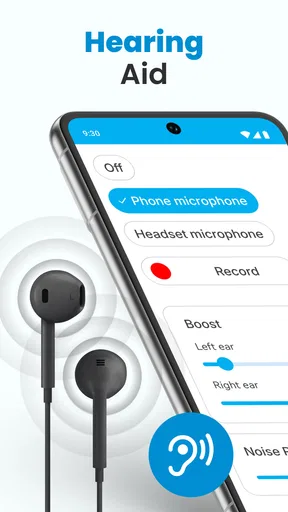
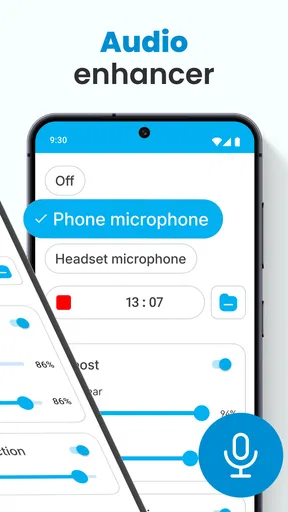
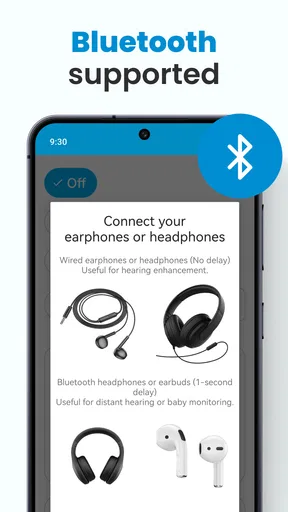
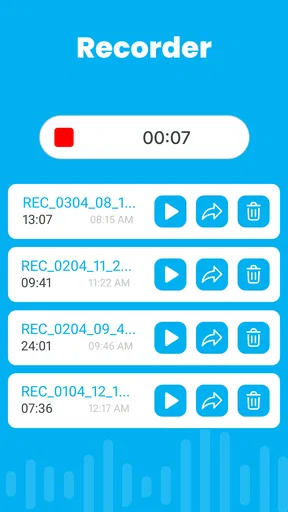
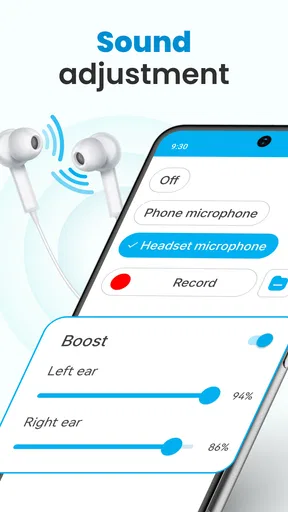
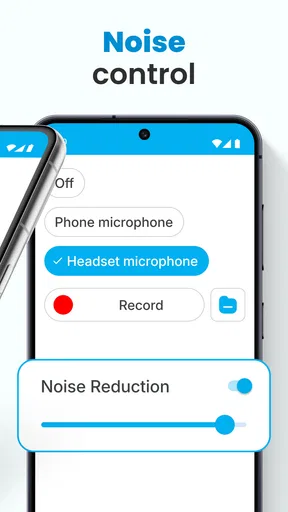
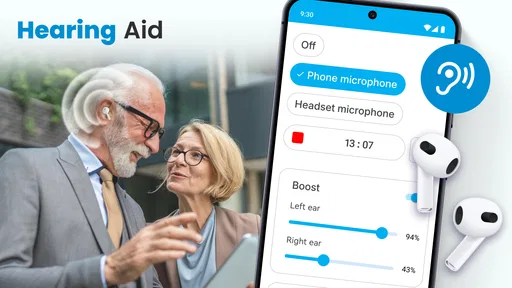
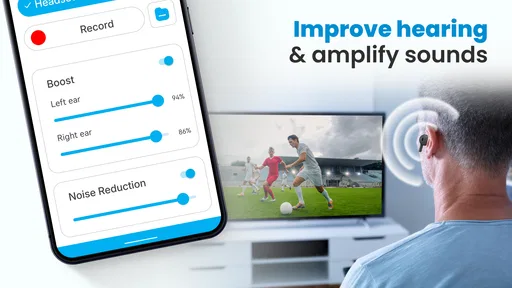
Our Review of Hearing Aid App for Android
 Analysis by Appyee
When I first try a phone-based hearing tool, I don’t expect it to replace dedicated hearing equipment; I want to know whether it can make one everyday listening moment less frustrating. Hearing Aid App for Android is aimed at that practical need, with sound adjustment and listening aids intended to help you pay closer attention to speech. My main advice for a first-time user is to approach it as a tool to test in a calm, familiar setting before relying on it in a busy room.
What to expect from a phone-based hearing aid
This is a medical app from Firehawk, and its appeal is straightforward: your Android phone becomes part of a listening setup rather than just a screen for calls and messages. The app is free to install, is rated for Everyone, and has reached over a million installs. Its average rating is 3.9 from around 9,200 ratings, which suggests plenty of people have tried it, but it is still worth judging the experience against your own phone, headphones, and hearing needs.
The current version is 2.1.2, and the app runs on Android 5.0 or later. Optional in-app purchases range from $0.99 to $99.99 per item, so I would check the purchase screens carefully and avoid assuming that every option is included at no cost. For basic evaluation, begin by finding out what you can do without buying anything; that gives you a clearer sense of whether the app suits you before you spend.
A phone-based amplifier has a different role from a professionally fitted hearing aid. It can be useful when you want to experiment with making nearby speech easier to follow, or when you already use headphones and want another listening option. It is not the right substitute for an assessment or prescribed equipment when hearing difficulty is persistent, sudden, or affecting your safety. I would treat it as a convenience to explore, not as a diagnosis or a promise of restored hearing.
Getting Started with the App
First things first, downloading the Hearing Aid App is a breeze. Head over to the Google Play Store, type in the name, and voilà, you’re ready to go. The installation process is quick, and before you know it, the app sits there on your home screen, just waiting to be explored. As soon as you open it, you’re greeted by a straightforward and user-friendly interface, which is a relief for those of us who aren’t exactly tech-savvy.
Set up in a quiet place first
Before turning up amplification, I’d choose a quiet room and test with a familiar voice or a television at a comfortable volume. Starting there helps separate two questions that are easy to confuse: whether the phone and listening device are connected properly, and whether the sound adjustment actually makes speech clearer. If you begin in a crowded restaurant, background noise can make it hard to tell which is the problem.
If you plan to use Bluetooth headphones or earbuds, connect them through your phone’s usual Bluetooth settings first, then return to the app and check that sound is coming through the device you expect. Keep the phone nearby during the first test, and change only one adjustment at a time. That simple routine makes it easier to undo a setting that sounds too loud or uncomfortable.
There is also a useful distinction between “louder” and “clearer.” Increasing amplification may make speech more noticeable, but it can also make clattering dishes, traffic, or other sounds more prominent. I would use the smallest adjustment that helps, then pause and listen for fatigue or harshness rather than chasing maximum volume.
Features That Make a Difference
Now, onto the juicy part: the features. This app is packed with some pretty nifty tools designed to enhance your hearing experience. It starts off with an adjustable sound amplifier that lets you tweak the audio settings according to your personal preference. Whether you’re in a crowded restaurant or a quiet library, you can customize the sound to fit your environment.
Another feature worth mentioning is the noise reduction capability. This is a lifesaver in noisy settings, as it filters out the background noise and allows you to focus on the conversation at hand. I found this particularly helpful during a recent family gathering where the chatter was overwhelming.
"The app's ability to tailor audio settings effortlessly is its standout feature."
Additionally, the app includes a live transcription feature. This means it can transcribe conversations in real-time, which is incredibly useful if you’re trying to keep up with multiple speakers or simply want to ensure you haven’t missed anything important.
Making the first useful test
For a meaningful first result, I would not start by testing every option. Sit with one person in a quiet room, place the phone where it can pick up the conversation, and compare a short exchange with the app’s assistance against listening normally. Then try a second position, such as keeping the phone closer to the speaker, before changing the sound level. This helps you learn whether placement or amplification matters more in your situation.
Try a short, ordinary conversation rather than asking someone to speak unnaturally loudly or repeating a memorized phrase. Notice whether you understand more words, whether the sound feels comfortable, and whether you can keep up without concentrating harder than usual. If the result is worse, lower the volume or stop; a louder signal is not automatically a better one.
Transcription can be a helpful backup when you miss a phrase, but I would not treat it as a perfect record. Names, overlapping voices, and quick changes of speaker can be difficult for any live text tool. In a meeting, use it to support your attention, not as a reason to stop listening or assume every line has been captured correctly.
Ease of Use
One of the aspects I appreciate most about the Hearing Aid App is its simplicity. You don’t have to be a tech wizard to navigate it. The app settings are intuitive, and all the features are neatly organized, which makes it easy to find what you need when you need it.
Moreover, the app plays nicely with Bluetooth devices. So, if you have Bluetooth headphones or earbuds, connecting them is as simple as pie. This integration enhances the overall experience, providing a seamless transition between your device and the app.
Common points of confusion
A frequent first-time mistake is expecting the app to behave exactly like a pair of hearing aids. A phone and Bluetooth earbuds form a general-purpose listening setup, so comfort, sound delay, fit, and the phone’s position can all affect how useful it feels. If audio seems delayed or awkward during a face-to-face conversation, try a simpler setup and a quieter room before deciding that the app is unsuitable.
Another point to keep in mind is that noise reduction does not mean every competing sound disappears. In a busy place, several people may speak at once, and a phone cannot always identify which voice you want to hear. Facing the person you want to follow, choosing a seat away from loud speakers, and asking one person to speak at a time may help more than repeatedly raising the volume.
Battery and comfort are practical considerations too. Using a phone as part of a listening setup means keeping it available during the conversation, while earbuds may not suit everyone for long stretches. For a brief one-to-one exchange, that trade-off can be manageable; for a full day of conversation, a dedicated device designed for extended wear may be more comfortable and dependable.
Real-Life Application
Let’s talk about real-world use. I took the app for a spin during various activities, from watching TV to attending a virtual meeting. The ability to adjust sound levels in real-time was a game-changer. It’s like having your own personal audio technician, always at the ready.
During a virtual meeting, the live transcription feature turned out to be unexpectedly helpful. I was able to follow along much more easily, and having a text record of the conversation was a bonus for later reference.
Where it fits—and where it doesn’t
One realistic use is a short visit with a relative at home. I would open the app before they arrive, check the headphones in a quiet moment, and set the phone on a stable surface nearer the person speaking rather than holding it and moving it constantly. If the conversation shifts to another person across the room, I would reposition the phone instead of turning the sound up immediately. It is a small workflow, but it can keep the setup from becoming another distraction.
For television, the app may be worth trying when you want to experiment with sound while using headphones. For a virtual meeting, live text may help you recover a missed phrase or follow a discussion. In both cases, I would keep expectations modest: different audio sources and rooms can produce different results, and a feature that helps in a quiet call may be less useful with overlapping voices.
Compared with simply raising the television or phone volume, an app offers more personal adjustment and can be less disruptive to other people nearby. Compared with a dedicated hearing device, though, it asks you to manage a phone, headphones, and settings, and it does not provide the individualized fitting that professional equipment can offer. If you already have hearing aids that are comfortable and effective, this app is more of an extra experiment than a replacement.
I would especially suggest trying it to someone who wants to explore a low-commitment listening aid, already owns compatible headphones, and has a specific situation to test. I would skip relying on it as the sole solution if you struggle to hear alarms, traffic, or important instructions, or if you need consistent help throughout the day. In those cases, speak with a qualified hearing professional about options suited to your needs.
Practical trade-offs before you rely on it
Think about the setting before opening the app. A quiet conversation with one speaker is a fair test; a crowded gathering with several voices is a much tougher one. If you know you will be in a noisy place, choosing a quieter table or moving closer to the person speaking may improve the exchange more reliably than trying to make every sound louder.
It is also sensible to agree on a simple fallback with the person you are speaking to. If you miss something, ask them to repeat it or rephrase it rather than guessing from a partial transcription. This is especially useful for names, dates, directions, or anything important enough that a small misunderstanding would matter.
Because the app has optional purchases, I would avoid buying anything until you have tried the basic listening flow in the situations that matter to you. A purchase only makes sense if the specific option addresses a problem you have identified and you understand its cost. The app’s free starting point makes it possible to judge its usefulness first, but the range of possible purchase prices is broad enough that a careful check is worthwhile.
When another option is the better choice
If the main difficulty is understanding speech in several environments every day, a hearing assessment is a better next step than cycling through phone settings. A clinician can help identify the kind of support that fits your hearing, while a dedicated hearing aid may offer a more practical long-term experience. This app is most convincing as an accessible trial or occasional aid, not as a universal fix.
There are also situations where the phone itself is the wrong tool: you may not want to keep it close during a conversation, your earbuds may be uncomfortable, or the sound may not feel natural. Those are reasonable reasons to stop. The point of a first test is not to force yourself to adapt, but to find out whether this particular setup makes communication easier without adding more effort.
Final Thoughts
In a nutshell, the Hearing Aid App for Android is a solid choice for anyone looking to enhance their hearing experience. It combines ease of use with powerful features, making it accessible for everyone. Whether you’re in a bustling city or the comfort of your home, this app has tools to make your life a bit easier.
So, if you’re on the lookout for an app that can help you stay connected and engaged, give this one a try. It might just become your new best friend in navigating the auditory world.
Ready to dive in? You can download the app from the Google Play Store and start exploring a world of clearer sound today!
Verdict
Strengths of Hearing Aid App for Android
- User-friendly interface for easy navigation.
- Customizable sound settings for personal needs.
- Real-time sound amplification feature.
- Works with most Bluetooth devices.
- No need for extra hardware; uses phone's mic.
Limitations of Hearing Aid App for Android
- May drain battery quickly during use.
- Requires Android 7.0 or higher.
- Limited free features; premium required.
- Background noise can interfere with clarity.
- May not replace professional hearing aids.
Other Releases by Firehawk
View All
Piano: Learn & Play Songs
Music & Audio4.8

Transparent Wallpaper
Personalization4.5

Battery Charging Animation
Personalization4.6

Video Voice Editor + Effects
Music & Audio4.5
Similar Picks in This Category
View All
WebMD: Symptom Checker
WebMD, LLC4.1

Microphone Amplifier
DOSA Apps4.2

Anatomy Learning - 3D Anatomy
3D Medical OU4.5

Period Tracker and Calendar
SimpleInnovation4.9

GoodRx: Prescription Coupons
GoodRx4.8

CVS Health
CVS Pharmacy4.5
Frequently Asked Questions
What features does the Hearing Aid App offer?
The Hearing Aid App enhances audio clarity by amplifying surrounding sounds. It includes features like noise reduction, customizable sound profiles, and real-time hearing adjustments. Users can fine-tune frequencies to suit their hearing needs, making it a versatile tool for various environments.
Is the Hearing Aid App compatible with all Android devices?
The app is compatible with most Android devices running version 7.0 or higher. However, performance may vary based on hardware specifications, such as the phone’s microphone and speaker quality. It's recommended to check the app’s compatibility details on the Google Play Store before downloading.
Does the Hearing Aid App require an internet connection to function?
No, the Hearing Aid App primarily operates offline once downloaded. An internet connection is only necessary for initial installation and updates. This ensures that users can rely on the app in various situations without needing to worry about connectivity issues.
Are there any privacy concerns with using the Hearing Aid App?
The app prioritizes user privacy by not recording or storing audio data. It processes sounds in real-time without retaining any information. Users can review the app’s privacy policy to ensure their data is handled securely and understand how their information is protected.
How user-friendly is the Hearing Aid App for first-time users?
The app is designed with an intuitive interface, making it accessible for first-time users. It includes a step-by-step guide to help users set up and customize their hearing experience. Additionally, customer support is available to assist with any technical questions or issues.
